Lead Tracking Software vs Excel Spreadsheet: Which Is Better for Growing Businesses in 2026?
Lead Tracking Software vs Excel Spreadsheet: Which One Helps Your Business Grow Faster? Every business generates leads, but not every business converts them efficiently. Many…
Lead Tracking Software vs Excel Spreadsheet: Which One Helps Your Business Grow Faster?
Every business generates leads, but not every business converts them efficiently. Many startups and small businesses begin by managing leads in Microsoft Excel because it is familiar, affordable, and easy to access. However, as the number of leads increases, spreadsheets become difficult to maintain, resulting in missed follow-ups, duplicate entries, inaccurate reports, and lost sales opportunities. This is where a dedicated sales tracking software makes a significant difference. Modern lead management solutions, such as Fidus360 LeadTrack, help businesses organize leads, automate follow-ups, track sales activities, and improve conversion rates without relying on manual processes. In this guide, we'll compare Lead Tracking Software vs Excel Spreadsheet, highlight the advantages and limitations of each, and help you determine the right solution for your business.
What Is Lead Tracking?
sales tracking software is the process of recording, monitoring, and managing every interaction a potential customer has with your business—from the first inquiry to the final purchase. A structured online lead tracking process helps businesses:
- Capture leads from multiple channels
- Assign leads to the right sales representative
- Schedule follow-ups
- Track communication history
- Monitor sales performance
- Improve customer experience
- Increase conversion rates
Without a proper system, businesses risk losing valuable sales opportunities.
What Is an Excel Lead Tracker?
An Excel lead management app is a spreadsheet used to manually store customer information. Typical columns include:
- Lead Name
- Company Name
- Phone Number
- Email Address
- Source
- Status
- Follow-up Date
- Sales Representative
- Remarks
While Excel is useful for organizing small datasets, it was not designed to manage dynamic sales processes or customer relationships.
What Is Lead Tracking Software?
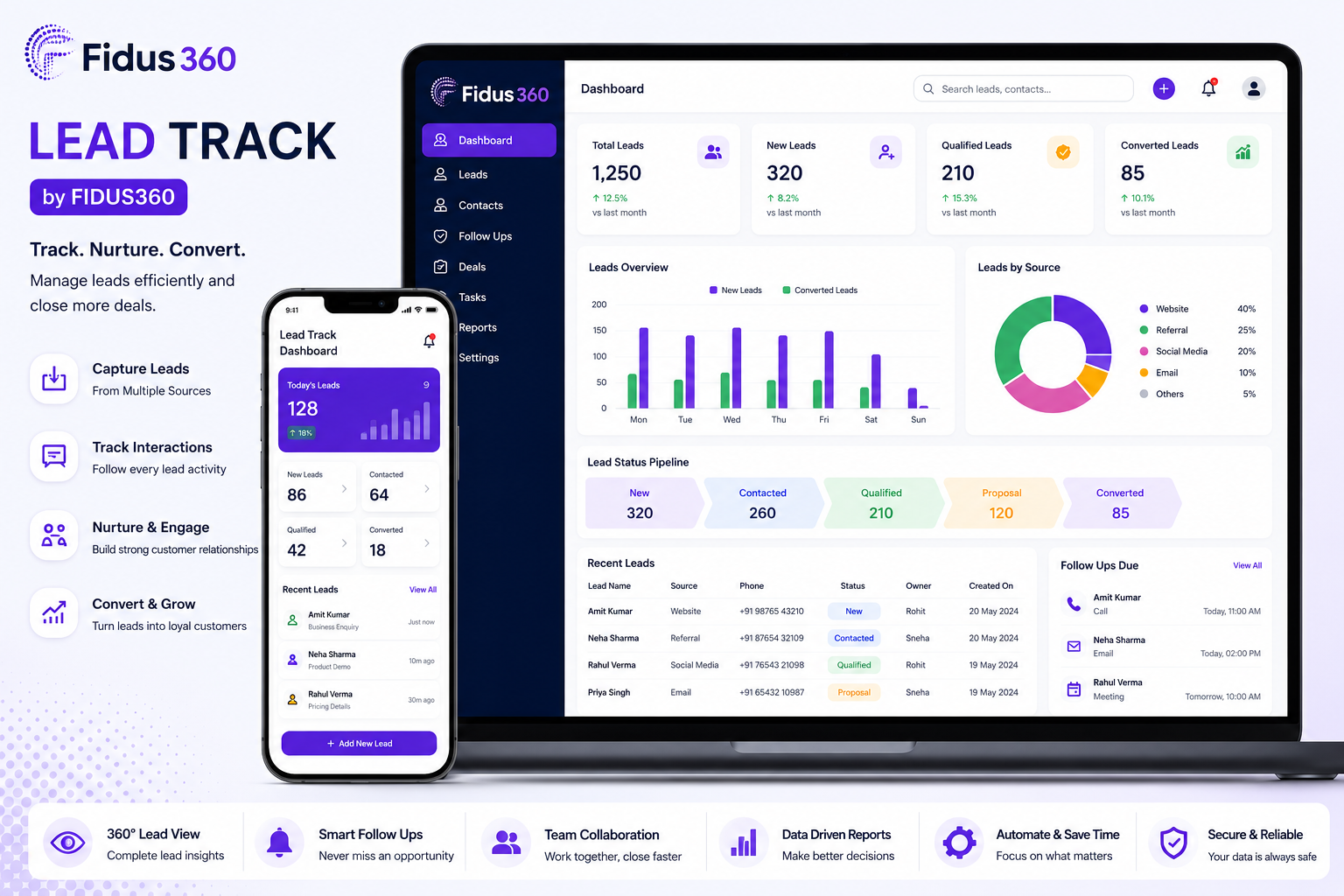
Lead Tracking Software is a digital platform that automates and streamlines the entire lead management process. Instead of manually updating spreadsheets, businesses can manage every lead from a centralized dashboard. Fidus360 lead management app provides businesses with tools to:
- Capture leads automatically
- Assign leads instantly
- Track customer interactions
- Schedule reminders
- Manage sales pipelines
- Generate reports
- Improve team collaboration
- Monitor conversion performance
The result is a faster, more organized, and more efficient sales workflow.
Ease of Managing Leads
Excel works well for maintaining small lists. However, once your business starts receiving dozens or hundreds of leads each week, manually updating spreadsheets becomes time-consuming. Lead Tracking Software organizes every lead automatically, making it easier to search, filter, and update customer information.
Follow-Up Management
One of the biggest reasons businesses lose customers is missed follow-ups. With Excel: No automatic reminders Manual tracking Easy to forget appointments With LeadTrack, sales teams receive reminders and notifications, ensuring timely communication with every prospect.
Team Collaboration
Sales teams often need access to the same customer information. Excel files can create issues such as: Multiple versions Accidental edits Data conflicts File sharing challenges Lead Tracking Software allows teams to work from one centralized platform, ensuring everyone has access to updated information.
Sales Pipeline Visibility
Excel only stores information. It does not visually display where each customer is in the sales process. online crm and lead management offers a visual sales pipeline, making it easy to understand: New Leads Contacted Qualified Proposal Sent Negotiation Won Lost This helps sales managers identify bottlenecks and improve performance.
Automation Saves Time
Sales professionals spend significant time on repetitive administrative tasks. Lead Tracking Software automates many of these activities: Lead assignment Follow-up reminders Status updates Activity tracking Notifications Reports Automation allows sales teams to focus more on selling and less on data entry.
Data Accuracy
Manual spreadsheet updates increase the likelihood of: Duplicate records Missing information Incorrect contact details Human error Lead management software reduces these risks through centralized records and validation features.
Reporting and Analytics
Business decisions should be based on data. Excel can generate basic charts, but creating meaningful reports requires manual effort. Lead Tracking Software provides dashboards that help businesses measure: Total leads Conversion rates Lead sources Sales performance Pending follow-ups Team productivity These insights enable better decision-making.
Scalability
As your business grows, your lead database grows too. Managing thousands of leads in Excel becomes increasingly difficult. Lead Tracking Software is designed to handle business growth while maintaining performance and organization.
Common Problems with Excel Lead Tracking
Businesses using spreadsheets often encounter:
- Missed follow-up opportunities
- Duplicate lead entries
- Difficulty finding customer information
- Limited collaboration
- No automation
- Lack of sales visibility
- Time-consuming updates
- Inconsistent reporting
- Risk of accidental file deletion
- Version control issues
These challenges can slow sales growth and impact customer satisfaction.
Benefits of Using Lead Tracking
LeadTrack helps businesses streamline lead management with features such as:
- Centralized lead database
- Automated lead assignment
- Follow-up reminders
- Sales pipeline management
- Activity timeline
- Team collaboration
- Lead source tracking
- Performance analytics
- Secure cloud-based access
- Mobile-friendly interface
- Scalable architecture for growing businesses
- These capabilities reduce manual work and support a more efficient sales process.
When Is Excel Still a Good Option?
Excel may be suitable if:
- You receive fewer than 20 leads per month.
- Only one person manages sales.
- Reporting requirements are minimal.
- There is no need for automation or collaboration.
For many growing businesses, these conditions change quickly, making a dedicated solution more practical.
When Should You Switch to Lead Tracking Software?
Consider switching when:
- Lead volume increases consistently.
- Follow-ups become difficult to manage.
- Multiple team members need access to lead information.
- Sales reporting becomes time-consuming.
- You want better visibility into your sales pipeline.
- Manual processes begin affecting productivity.
Why Businesses Choose Fidus360 LeadTrack
Businesses looking to improve their sales operations choose Fidus360 LeadTrack because it combines lead tracking, automation, collaboration, and analytics in a single platform. Instead of managing customer information across multiple spreadsheets, teams can work from one centralized system that supports consistent follow-ups, improved visibility, and data-driven decision-making.
Frequently Asked Questions
Is Excel good for lead tracking?
Excel can be suitable for managing a small number of leads, but it becomes difficult to maintain as lead volume and team size grow.
What is the biggest advantage of Lead Tracking Software?
It automates lead management tasks, improves follow-up consistency, and provides better visibility into the sales pipeline.
Why should businesses move from Excel to Lead Tracking Software?
A dedicated solution reduces manual work, minimizes errors, supports team collaboration, and offers reporting features that spreadsheets lack.
Is LeadTrack suitable for small businesses?
Yes. LeadTrack is designed to help businesses of different sizes organize leads, automate follow-ups, and manage sales activities efficiently.
Can Lead Tracking Software improve sales conversions?
A structured lead management process helps sales teams respond faster, stay organized, and maintain consistent follow-ups, all of which can contribute to improved conversion rates.
Related apps